If you have a big network with multiple Access Switches connecting to the core switches or routers then tracing a device like a PC or a laptop for troubleshooting or security purposes is one of those tasks that you often end up doing. This is not a difficult task but can certainly be time consuming.
Lets start with an IP address on hand. If you have an IP address on hand quickly ping and check if the device is pingable. If yes, then simply logon to one of your core switches or routers and do a simple
sh ip arp
Core1# sh ip arp 192.168.1.15
Protocol Address Age (min) Hardware Addr Type Interface
Internet 192.168.1.15 22 0000.1111.1111 ARPA Vlan1
From the above you know the MAC Address of for the device:
IP Address : 192.168.1.15
MAC Address : 0000.1111.1111
Now, do a
show mac-address command on the core switch or router. This will show the interface to which it is connected or through which it is learned.
Example 1:
rssv125-sw5# show mac-address-table address 0002.3F39.BFE6
You will get a response similar to this:
          Mac Address Table
 -------------------------------------------
 Vlan    Mac Address       Type        Ports
 ----    -----------       --------    -----
   59    0002.3f39.bfe6    DYNAMIC     Fa0/24
 Total Mac Addresses for this criterion: 1
If your port is a FastEthernet port (Fa0/
nn) like this example shows, you know that you are connected to FastEthernet port 0/24 on switch 10.10.125.5 (rssv125-sw5).
However, many times you will get a response similar to this:
          Mac Address Table

-------------------------------------------

Vlan    Mac Address       Type        Ports

----    -----------       --------    -----

59    0002.3f39.bfe6    DYNAMIC     Gi0/1

Total Mac Addresses for this criterion: 1
The Gi0/
n indicates you are connected to a gigabit port. Since the gigabit ports only go to other switches, you know you are connected to another switch. To see what the neighboring switches are, use CDP (Cisco Discovery Protocol).
rssv125-sw5# show cdp neighbor Gi0/1 detail
The response should be something similar to this:
Device ID: rssv125-sw4

Entry address(es):

IP address: 10.10.125.4

Platform: cisco WS-C3550-24-PWR,  Capabilities: Switch IGMP

Interface: GigabitEthernet0/1,  Port ID (outgoing port):  GigabitEthernet0/1

[snip]
Now go back to the telnet step above and run through it again except this time use the 10.10.125.4 IP address from the show cdp neighbor output. Repeat until you find the switch and port you are connected to.
Core1# sh mac-address-table address 0000.1111.1111
Legend: * – primary entry
age – seconds since last seen
n/a – not available
vlan mac address type learn age ports
——+—————-+——–+—–+———-+————————–
Supervisor:
* 1 0000.1111.1111 dynamic Yes 10 Te1/1
This indicates that the device is either connected to the port or though another switch which is connected to the interface. Looking at this, it is very likely that this is a uplink (TenGigabit Ethernet link) to another Distribution or Access switch.
Sometimes, the output might show as follows [
note the Po1]
Legend: * – primary entry
age – seconds since last seen
n/a – not available
vlan mac address type learn age ports
——+—————-+——–+—–+———-+————————–
Supervisor:
* 1 0000.1111.1111 dynamic Yes 10 Po1
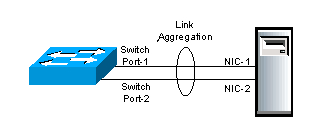
This indicates that there is a etherchannelis being setup. So do a "
show etherchannel" command to find the phsycial ports that are paired.
Core1# show etherchannel summary
Flags: D – down P – bundled in port-channel
I – stand-alone s – suspended
H – Hot-standby (LACP only)
R – Layer3 S – Layer2
U – in use f – failed to allocate aggregator
M – not in use, minimum links not met
u – unsuitable for bundling
w – waiting to be aggregated
Number of channel-groups in use: 6
Number of aggregators: 6
Group Port-channel Protocol Ports
——+————-+———–+———————————————–
1 Po1(SU) - Te1/1(P) Te2/1(P)
This shows the ports Te1/1 or Te2/1 as a source through which the address is learnt.
Now, do a "
show cdp neighbors" to show the directly connected devices.
Core1# sh cdp neighbors
Capability Codes: R – Router, T – Trans Bridge, B – Source Route Bridge
S – Switch, H – Host, I – IGMP, r – Repeater, P – Phone
Device ID Local Intrfce Holdtme Capability Platform Port ID
Access1 Ten 1/1 129 R S I WS-C6509 Ten 1/1
That tells you, it is the Access switch 1 that is connected to Te1/1 and not the device itself.
Now, log onto the Access switch and do a "show mac-adddress-table" command for the MAC address and that should show the interface to which it is connected
[NOTE: unless it is a distribution switch to again there are a bunch of Access switches connected in which case, you need to go through the whole procedure as above again]
Access1# show mac-address-table 0000.1111.1111
vlan mac address type learn age ports
——+—————-+——–+—–+———-+————————–
Supervisor:
* 1 0000.1111.1111 dynamic Yes 10 Gi1/24
As you can see which port the device is connected and on which switch.
Now do a "
show interface" command to show the port details.
Access1>sh int gigabitEthernet 1/24
GigabitEthernet1/24 is up, line protocol is up (connected)
Hardware is C6k 1000Mb 802.3, address is xxxx.xxxx.xxxx (bia xxxx.xxxx.xxxx)
MTU 1500 bytes, BW 1000000 Kbit, DLY 10 usec,
reliability 255/255, txload 1/255, rxload 1/255
Encapsulation ARPA, loopback not set
Keepalive set (10 sec)
Full-duplex, 1000Mb/s
…..
…
..
.
There you go you found the device switchport that you tried to trace!!!
Reference:
1. HowTo: Find switchport for a MAC Address on a Cisco Catalyst Switch
http://www.itsyourip.com/cisco/howto-find-switchport-for-a-mac-address-on-a-cisco-catalyst-switch/
2. How to Determine Which Switch and Port You are Connected To
http://www.tech-recipes.com/rx/874/how_to_determine_switch_port_connected/
3. Troubleshooting Switch Port and Interface Problems
http://www.cisco.com/en/US/products/hw/switches/ps700/products_tech_note09186a008015bfd6.shtml
4.Dettermine which switch port connected to which switch and which port
https://learningnetwork.cisco.com/message/80118